Shared search · Sep 9, 2026
How do search engines crawl and index data from millions of websites?
Search engines handle millions of websites through a continuous pipeline of discovery, crawling, processing, indexing, and ranking.
1. Discovering URLs
Search engines begin with known URLs and continually find more through:
- Links on already-known pages
- XML sitemaps submitted by website owners
- Manually submitted URLs
- Previously crawled pages that may have changed
As crawlers follow links, they add newly discovered URLs to a large crawl queue. 1
4
2. Crawling pages
Automated programs called web crawlers, spiders, or bots—such as Googlebot—request pages from web servers. Large search engines distribute this work across huge numbers of computers; Google says it uses a large computer infrastructure to crawl billions of pages. 1
The crawler typically:
- Requests a URL
- Downloads its HTML, text, images, videos, and other resources
- Reads links and metadata
- Adds newly found URLs to the crawl queue
- Records whether the page was successfully retrieved
Crawlers also respect site rules such as robots.txt, server limitations, and crawl-rate controls. They do not continuously download every page at the same frequency: popular, frequently updated pages may be revisited more often than stable or rarely linked pages.
3. Managing crawl capacity
Because crawling consumes bandwidth and computing resources, the search engine prioritizes URLs using signals such as:
- How important or authoritative the page appears to be
- How often it changes
- Whether it has many links pointing to it
- Whether it is new or previously seen
- The site’s server capacity and response speed
This means search engines may know about a URL but delay crawling it—or crawl it without ultimately indexing it.
4. Processing and rendering
The downloaded content is parsed to identify:
- Text and headings
- Page structure and links
- Titles and descriptions
- Images and video
- Structured data
- Canonical URLs
- Language and topic
- Duplicate or near-duplicate content
Pages that rely heavily on JavaScript may also be placed in a rendering queue so the search engine can process the page as a browser would. Rendering is more computationally expensive, so it may occur separately from the initial HTML fetch. 4
5. Building the index
The search engine converts processed pages into a massive, distributed index—similar to a library catalogue. It stores information about the words, concepts, entities, links, media, and other characteristics found on each page. 4
6
A simplified example is an inverted index:
1"electric cars" → page A, page C, page F2"battery range" → page B, page C, page G
When someone searches for “electric car battery range,” the engine can quickly retrieve pages associated with those terms instead of scanning the entire web.
Search engines also:
- Detect duplicates
- Choose canonical versions
- Filter spam and malware
- Decide whether a page has enough value to include
- Store multiple versions and signals for different devices, languages, and locations
Crawling does not guarantee indexing: a page can be downloaded but excluded from the searchable index.
6. Updating the index
The process is continuous rather than a one-time download. Search engines revisit pages, compare new content with previous versions, detect deleted or redirected URLs, and update their index. News sites and frequently changing pages may be refreshed rapidly, while less active pages may be revisited less often.
7. Ranking results
When a user submits a query, the engine:
- Interprets the query and its intent
- Retrieves potentially relevant documents from the index
- Scores them using hundreds or thousands of signals
- Removes spam and unsuitable results
- Orders the results by estimated relevance, quality, freshness, location, language, and other factors
This is why results appear in milliseconds: the expensive work of crawling and organizing pages happened beforehand. The search engine usually searches its index, not the live web, at query time.
In short:
1Discover URLs2 ↓3Crawl and download pages4 ↓5Parse and render content6 ↓7Filter, analyze, and store information8 ↓9Build a searchable index10 ↓11Retrieve and rank results for each query
Related
Where can I find free and reliable public datasets for research and analytics?
Here are strong starting points for free, public datasets, organized by use case:
| Source | Best for | Notes |
|---|---|---|
| Data.gov | U.S. government, health, education, climate, transport, economics | The U.S. government’s central open-data portal, with hundreds of thousands of datasets. |
| World Bank Open Data | Global development, poverty, health, education, economics | Provides free access to country-level indicators, time series, surveys, and development datasets. |
| World Bank Data Catalog | Microdata and development research | Includes datasets from the World Bank’s microdata, finance, energy, and open-data platforms. |
| OECD Data | Economic, labor, education, policy, and social statistics | Searchable catalogue of official OECD datasets by policy area and topic. |
| UNdata | Population, trade, energy, gender, agriculture, and global indicators | Aggregates UN statistical databases and contains tens of millions of records. |
| Eurostat | European economic and social statistics | Official EU datasets that can be customized and downloaded in multiple formats. |
| European Data Portal | EU institutions, national governments, geospatial and public-sector data | Provides access to datasets and catalogues from European countries and institutions. |
| UCI Machine Learning Repository | Machine-learning benchmarking and teaching | Maintains hundreds of datasets widely used by the machine-learning community. |
| Kaggle Datasets | Data-analysis projects, competitions, and practice | Offers a very large collection of downloadable datasets, though quality and licensing vary by contributor. |
| NOAA Open Data | Weather, climate, oceans, satellites, and environmental science | Includes climate records, sea-surface temperature, precipitation, ocean, and atmospheric datasets. |
| GBIF | Biodiversity, species occurrences, ecology, and conservation | Provides free, open-access biodiversity data, including species observations and museum records. |
Good choices by project type
- Business and economic analysis: Data.gov, World Bank, OECD, Eurostat
- Machine learning practice: UCI, Kaggle
- Public policy or international research: World Bank, UNdata, OECD
- Climate and environmental analysis: NOAA, Data.gov
- Ecology and biodiversity: GBIF
- European regional analysis: Eurostat and the European Data Portal
How to judge whether a dataset is reliable
Before using one, check:
- Publisher: Prefer government agencies, universities, international organizations, or established research institutions.
- Documentation: Look for a data dictionary, methodology, collection procedure, and definitions.
- Update date: Confirm that the data is current enough for your research question.
- Coverage: Check geography, time period, sample size, missing values, and known biases.
- License: Verify whether commercial use, redistribution, and modification are allowed.
- Version and citation information: Record the dataset version, download date, DOI or landing-page URL.
- Primary source: On aggregator sites such as Kaggle, trace the dataset back to its original publisher when possible.
Practical rule: use Kaggle or similar repositories for convenient exploration, but use the original government or research institution source for publication-quality analysis whenever available.
Related
How can I use SQL queries to find source schema details in relational databases?
You can inspect a relational database’s metadata—often called its catalog or data dictionary—using standard INFORMATION_SCHEMA views and database-specific system catalogs. INFORMATION_SCHEMA is portable across many systems, while catalogs such as PostgreSQL’s pg_catalog provide more detail. 1
4
1. List schemas
1SELECT schema_name2FROM information_schema.schemata3ORDER BY schema_name;
To list schemas with their tables:
1SELECT DISTINCT table_schema2FROM information_schema.tables3ORDER BY table_schema;
2. List tables and views
1SELECT table_schema, table_name, table_type2FROM information_schema.tables3WHERE table_schema NOT IN ('information_schema')4ORDER BY table_schema, table_name;
For views:
1SELECT table_schema, table_name2FROM information_schema.views3ORDER BY table_schema, table_name;
INFORMATION_SCHEMA.TABLES and INFORMATION_SCHEMA.COLUMNS are commonly used to discover tables and columns in a database. 1
3
3. Inspect columns
1SELECT2 table_schema,3 table_name,4 ordinal_position,5 column_name,6 data_type,7 character_maximum_length,8 numeric_precision,9 is_nullable,10 column_default11FROM information_schema.columns12WHERE table_schema = 'public'13 AND table_name = 'customers'14ORDER BY ordinal_position;
This tells you the column order, names, types, sizes, nullability, and defaults.
To search for a column across the database:
1SELECT table_schema, table_name, column_name, data_type2FROM information_schema.columns3WHERE column_name ILIKE '%customer%';
ILIKE is PostgreSQL syntax; use LIKE in systems that do not support case-insensitive ILIKE.
4. Find primary keys
1SELECT2 tc.table_schema,3 tc.table_name,4 kcu.column_name,5 kcu.ordinal_position,6 tc.constraint_name7FROM information_schema.table_constraints AS tc8JOIN information_schema.key_column_usage AS kcu9 ON tc.constraint_name = kcu.constraint_name10 AND tc.table_schema = kcu.table_schema11 AND tc.table_name = kcu.table_name12WHERE tc.constraint_type = 'PRIMARY KEY'13ORDER BY tc.table_schema, tc.table_name, kcu.ordinal_position;
The ordinal_position matters because a primary key can contain multiple columns.
5. Find foreign-key relationships
1SELECT2 tc.table_schema,3 tc.table_name,4 kcu.column_name,5 tc.constraint_name,6 ccu.table_schema AS referenced_schema,7 ccu.table_name AS referenced_table,8 ccu.column_name AS referenced_column9FROM information_schema.table_constraints AS tc10JOIN information_schema.key_column_usage AS kcu11 ON tc.constraint_name = kcu.constraint_name12 AND tc.table_schema = kcu.table_schema13JOIN information_schema.constraint_column_usage AS ccu14 ON tc.constraint_name = ccu.constraint_name15 AND tc.table_schema = ccu.table_schema16WHERE tc.constraint_type = 'FOREIGN KEY'17ORDER BY tc.table_schema, tc.table_name;
This produces a useful relationship map, such as:
1orders.customer_id → customers.customer_id
For more detailed referential actions—such as CASCADE or SET NULL—inspect information_schema.referential_constraints.
6. List all constraints
1SELECT2 constraint_schema,3 table_name,4 constraint_name,5 constraint_type6FROM information_schema.table_constraints7WHERE constraint_schema = 'public'8ORDER BY table_name, constraint_type;
To inspect columns involved in constraints:
1SELECT2 constraint_schema,3 table_name,4 constraint_name,5 column_name6FROM information_schema.constraint_column_usage7WHERE table_schema = 'public'8ORDER BY table_name, constraint_name, column_name;
7. Find indexes
Index metadata is less portable, so use the database’s system catalog.
PostgreSQL
1SELECT2 schemaname,3 tablename,4 indexname,5 indexdef6FROM pg_catalog.pg_indexes7WHERE schemaname = 'public'8ORDER BY tablename, indexname;
PostgreSQL exposes index definitions through pg_catalog.pg_indexes. 4
SQL Server
1SELECT2 s.name AS schema_name,3 t.name AS table_name,4 i.name AS index_name,5 i.type_desc,6 i.is_unique7FROM sys.indexes AS i8JOIN sys.tables AS t9 ON i.object_id = t.object_id10JOIN sys.schemas AS s11 ON t.schema_id = s.schema_id12WHERE i.name IS NOT NULL13ORDER BY s.name, t.name, i.name;
8. Inspect view definitions
1SELECT2 table_schema,3 table_name,4 view_definition5FROM information_schema.views6WHERE table_schema = 'public';
Some databases truncate or restrict view-definition text in INFORMATION_SCHEMA; their native catalogs may provide the complete definition.
PostgreSQL
1SELECT2 schemaname,3 viewname,4 definition5FROM pg_catalog.pg_views6WHERE schemaname = 'public';
9. Generate a compact table profile
1SELECT2 c.table_schema,3 c.table_name,4 c.ordinal_position,5 c.column_name,6 c.data_type,7 c.is_nullable,8 c.column_default9FROM information_schema.columns AS c10WHERE c.table_schema NOT IN ('information_schema', 'pg_catalog')11ORDER BY c.table_schema, c.table_name, c.ordinal_position;
This is a good starting query for exporting a basic data dictionary.
Important differences by database
- PostgreSQL: use
information_schemafor portable metadata andpg_catalogfor indexes, functions, exact definitions, and internal details.4
- SQL Server: use
INFORMATION_SCHEMAor catalogs such assys.tables,sys.columns,sys.indexes, andsys.foreign_keys; metadata visibility depends on your permissions.1
- MySQL: use
INFORMATION_SCHEMA; it exposes metadata such as databases, tables, columns, and data types.8
- Oracle: commonly uses
USER_*,ALL_*, andDBA_*views, such asUSER_TABLESandUSER_TAB_COLUMNS. - SQLite: use
sqlite_masterand pragmas such asPRAGMA table_info('customers').
A query may return only objects you own or are authorized to see. SQL Server, for example, limits metadata visibility according to the user’s permissions. 1
Related
How does Change Data Capture track real-time changes at the database source?
Change Data Capture (CDC) tracks changes at the source database and emits them as a sequence of events—usually inserts, updates, and deletes—for downstream systems such as data warehouses, lakes, caches, or applications. 2
5
How log-based CDC works
The most common production approach is transaction-log-based CDC:
-
A transaction changes source rows.
For example, an application inserts an order or updates a customer address. -
The database records the operation in its transaction log.
Depending on the database, this may be a transaction log, write-ahead log (WAL), binary log, or similar structure. The log is already used for recovery and replication. -
A CDC connector reads the log.
It tracks a durable position—such as a log sequence number, WAL position, or binlog offset—so it knows where to resume after a restart. -
The connector converts log records into change events.
An event commonly contains:- Operation type:
INSERT,UPDATE, orDELETE - Table and schema
- Primary-key values
- New row values
- Sometimes the previous row values
- Transaction ID, timestamp, and source log position
- Operation type:
-
Events are delivered downstream.
Consumers apply them to a target database, publish them to a message broker, or load them into analytical storage. The target can then be synchronized without repeatedly scanning the entire source table.
For example:
1UPDATE customers2SET status = 'active'3WHERE customer_id = 42;
A CDC event might look conceptually like:
1{2 "operation": "UPDATE",3 "table": "customers",4 "key": { "customer_id": 42 },5 "before": { "status": "pending" },6 "after": { "status": "active" }7}
In SQL Server, CDC reads the transaction log, writes captured changes to associated change tables, and exposes functions that let consumers retrieve changes over a specified range. 1
Other CDC methods
Trigger-based CDC
Database triggers execute whenever a row is inserted, updated, or deleted. The trigger writes the change to an audit or staging table, which a CDC process later reads.
Advantages:
- Works in many databases
- Can capture custom metadata
- Easy to understand and query
Trade-offs:
- Adds work to every write transaction
- Can increase source-database latency
- Requires changes to source-table definitions
- Trigger failures can affect application writes
Query- or timestamp-based capture
A process periodically queries rows using a column such as:
1SELECT *2FROM orders3WHERE updated_at > :last_successful_timestamp;
This is simpler but is not true log-based CDC. It can miss hard deletes, have problems with identical timestamps, and require careful handling of late-arriving or updated rows.
What “real time” means
CDC is generally real-time or near-real-time, not necessarily instantaneous. The delay depends on:
- How quickly the source log is written and made available
- Connector polling or streaming behavior
- Network and message-broker latency
- Downstream processing time
- Backpressure or failures
CDC is specifically intended to avoid the freshness problems and full-table scans associated with scheduled batch synchronization. 3
6
Important reliability features
A robust CDC pipeline usually includes:
- Initial snapshot: loads the existing table before streaming subsequent changes
- Checkpointing: stores the last safely processed log position
- Ordering: preserves transaction or key order where required
- Idempotent writes: allows safe reprocessing of an event
- Delete handling: propagates deletes instead of only copying current rows
- Schema-change handling: detects added, removed, or modified columns
- Replay and retention: keeps source logs or event history long enough to recover
- Monitoring: tracks capture lag, failures, and rejected events
The key idea is:
1Source transaction2 → database transaction log3 → CDC reader4 → change event stream5 → downstream target
CDC is therefore an extraction and synchronization mechanism, not a complete replacement for transformation or data modeling. 4
Related
What is the difference between log-based and trigger-based CDC?
Core difference
- Log-based CDC reads the database’s transaction or redo log after changes are committed.
- Trigger-based CDC runs database trigger code during an
INSERT,UPDATE, orDELETE, usually writing the change to an audit or staging table.
| Aspect | Log-based CDC | Trigger-based CDC |
|---|---|---|
| How it detects changes | Reads the database’s transaction log, which records writes for recovery and replication | Executes trigger logic when DML occurs |
| Impact on source workload | Usually low because it reads existing log records without adding work to each application statement | Adds processing to write transactions and can increase latency |
| Transaction handling | Can preserve commit order and transaction boundaries | Captures changes as part of the source transaction; trigger work may cause that transaction to fail |
| Performance at scale | Generally better for high-volume systems | Can become expensive when many rows are changed frequently |
| Implementation | Requires log access, permissions, connector support, and log-retention management | Requires creating and maintaining triggers and capture tables |
| Customization | Depends on the CDC tool and database log contents | Highly customizable—you can capture selected columns, users, business context, or custom rules |
| Deletes | Typically captured naturally from the log | Must be explicitly handled in DELETE triggers |
| Operational complexity | More infrastructure and monitoring complexity | Simpler conceptually, but triggers must be deployed consistently across tables and environments |
| Source coverage | Captures changes made through supported database logging mechanisms | Captures only changes that reach the configured triggers |
Example
A log-based connector observes a transaction such as:
1UPDATE accounts2SET balance = balance - 1003WHERE account_id = 10;
It then converts the database log record into an event such as:
1{2 "operation": "UPDATE",3 "table": "accounts",4 "key": { "account_id": 10 },5 "after": { "account_id": 10, "balance": 900 }6}
A trigger-based design would add a trigger:
1CREATE TRIGGER accounts_audit_trigger2AFTER UPDATE ON accounts3FOR EACH ROW4INSERT INTO account_changes (5 account_id,6 old_balance,7 new_balance,8 changed_at9)10VALUES (11 OLD.account_id,12 OLD.balance,13 NEW.balance,14 CURRENT_TIMESTAMP15);
A downstream process then reads account_changes.
When to choose each
Prefer log-based CDC when:
- The database supports reliable log access.
- You need high throughput or low source impact.
- You need inserts, updates, deletes, ordering, and transaction metadata.
- You want to avoid modifying application tables or write paths.
- The CDC platform already supports the database.
Prefer trigger-based CDC when:
- Log access is unavailable or restricted.
- You need highly customized capture logic.
- You need to capture application-specific context that is not present in the transaction log.
- The change volume is modest.
- You can tolerate additional write overhead and trigger maintenance.
Practical rule
For production replication, streaming, and high-volume integration, log-based CDC is usually the default choice because it reads existing transaction records and generally minimizes impact on the source. 3 Trigger-based CDC is a useful fallback or customization mechanism, but its extra work occurs on the source write path, so poorly designed triggers can slow or even disrupt application transactions.
Neither approach eliminates the need for an initial snapshot, checkpointing, idempotent downstream processing, schema-change handling, and monitoring of capture lag. Also, exact behavior varies by database and CDC product; SQL Server’s native CDC, for example, reads the transaction log and stores captured changes in separate change tables. 5
Related
How should CDC events be applied to a target database?
CDC events should be applied to the target as ordered, idempotent mutations, not as blind inserts.
Recommended flow
1CDC stream2 → durable landing/staging area3 → validate and deduplicate4 → apply INSERT/UPDATE/DELETE5 → commit target changes6 → checkpoint source offset
1. Load the initial snapshot
First copy the existing source data into the target. Then begin applying CDC events from the source log position associated with that snapshot. This prevents a gap between the initial load and ongoing changes.
2. Key events by the target’s primary key
Each event should include the source table, operation type, primary key, and ordering metadata such as a log sequence number, transaction ID, or source timestamp.
3. Apply the operation appropriately
- Insert: insert the row.
- Update: update the row using its primary key.
- Delete: delete or tombstone the row using its primary key.
For most relational targets, use an upsert or MERGE rather than separate application logic:
1MERGE INTO target_customers AS t2USING staged_customer_changes AS s3ON t.customer_id = s.customer_id45WHEN MATCHED AND s.operation = 'DELETE'6 THEN DELETE78WHEN MATCHED AND s.operation IN ('INSERT', 'UPDATE')9 THEN UPDATE SET10 name = s.name,11 status = s.status,12 source_sequence = s.source_sequence1314WHEN NOT MATCHED AND s.operation <> 'DELETE'15 THEN INSERT (16 customer_id, name, status, source_sequence17 )18 VALUES (19 s.customer_id, s.name, s.status, s.source_sequence20 );
Upserts keyed by the primary key make replaying the same event safe, which is essential because consumers may retry messages after failures. 1
4
4. Preserve ordering
Events for the same key must be applied in source order. For example:
1INSERT customer 422UPDATE customer 423DELETE customer 42
must not be applied as DELETE → UPDATE → INSERT.
Use source sequence numbers or log positions to reject stale events:
1... WHERE incoming.source_sequence > target.source_sequence
If using a partitioned message system, route events for the same primary key to the same partition where possible; Kafka, for example, guarantees ordering within a partition, not across partitions. 2
5. Make retries safe
The target write and processing checkpoint should be coordinated:
- Read a batch of events.
- Apply the batch in a target transaction.
- Record the processed event IDs or source offsets.
- Commit the target transaction.
- Acknowledge or advance the source offset only after the write succeeds.
If the process crashes before acknowledgment, the batch may be replayed—but idempotent MERGE logic or event-ID tracking prevents duplicate effects. 7
8
6. Handle transactions carefully
If the CDC system provides transaction boundaries, preserve them when the target requires transactional consistency. For example, if an order and its payment record were committed together at the source, applying only one to the target temporarily may produce an inconsistent state.
For analytics targets, micro-batches are often acceptable. For operational replicas, smaller batches and transaction-aware application may be preferable.
7. Handle schema changes and deletes explicitly
The target process should define what happens when:
- A source column is added, removed, or renamed
- A column changes type
- A source row is hard-deleted
- A delete arrives before the corresponding insert
- A table is truncated
For analytical systems, deletes may be represented as tombstones or applied through a merge. For an exact replica, they should normally remove the target row.
Practical best practices
- Use a durable staging layer so events can be replayed.
- Use primary-key-based upserts.
- Store the latest applied source sequence or log position per row or stream.
- Deduplicate by event ID, transaction ID plus row key, or source offset.
- Commit offsets only after successful target writes.
- Monitor replication lag, failed events, duplicate rates, and dead-letter records.
- Periodically reconcile target counts or checksums with the source.
- Avoid assuming that “exactly once” delivery removes the need for idempotent target logic; retries and recovery still occur.
The central rule is: apply each event according to its operation and source order, make the write replay-safe, and checkpoint only after the target commit succeeds.
Related
How do organizations ensure data privacy and compliance when tracking user data sources?
Organizations typically combine data governance, privacy controls, security, and auditability when tracking where user data comes from and how it is used.
1. Define purpose and legal basis
Before collecting or linking data, they document:
- What data is collected
- The business purpose
- The legal basis—such as consent, contract, or legitimate interest
- Which systems and third parties may receive it
- How long it will be retained
Privacy notices should explain these uses clearly, and consent should be recorded where consent is required. Privacy programs should also maintain processes for responding to incidents and completing privacy training 1.
2. Maintain a data inventory and lineage
Organizations use a data catalog or registry to record:
- Source system and collection method
- Data owner and processor
- Data classification, such as personal, sensitive, or public
- Transformations and downstream destinations
- Retention period and deletion requirements
- Applicable jurisdiction and regulatory restrictions
This creates provenance: the ability to answer where a user record originated, what happened to it, and where it was sent. Data-lineage and audit controls can track access and modifications over time 7.
3. Minimize and classify data
They collect only the fields needed for the stated purpose, avoid copying raw identifiers unnecessarily, and classify sensitive fields such as:
- Names and contact details
- Government identifiers
- Location and behavioral data
- Health, financial, or biometric data
- Account credentials
Common protections include tokenization, pseudonymization, masking, encryption, and aggregation. Identifiers should be separated from behavioral or analytical data when possible.
4. Restrict access
Access is generally enforced through:
- Role-based access control—access based on job role
- Attribute-based policies—access based on factors such as region, sensitivity, or purpose
- Least privilege and just-in-time access
- Strong authentication and periodic access reviews
- Row-, column-, or field-level security
Role- or attribute-based access, data obfuscation, and consent management are established governance controls for secure data sharing 4. Importantly, access to a data catalog should not automatically grant access to the underlying personal data.
5. Record consent and user rights
Systems should associate consent or preference records with the relevant user and purpose, including:
- When and how consent was obtained
- The wording shown to the user
- The purposes covered
- Whether consent was withdrawn
- Which downstream systems must stop processing
They should also support applicable rights such as access, correction, deletion, portability, and objection. A withdrawal or deletion request must be propagated to derived datasets and CDC pipelines where legally required.
6. Secure CDC and source tracking
For CDC pipelines specifically:
- Encrypt data in transit and at rest.
- Avoid placing unnecessary personal data in event payloads.
- Restrict access to raw event streams and replay storage.
- Retain only the event history required for operations, audit, or law.
- Mask or tokenize sensitive fields before publishing events.
- Use tenant and environment isolation.
- Log who accessed, replayed, exported, or changed an event stream.
- Ensure deletion workflows cover staging tables, topics, caches, backups, and derived tables.
CDC can improve auditability by retaining historical changes, but that history can itself become a sensitive record requiring access policies and retention controls 8.
7. Monitor and audit continuously
Organizations maintain tamper-resistant logs for:
- Data access and exports
- Consent changes
- Schema and policy changes
- Data sharing with third parties
- CDC processing and replay activity
- Deletion and correction requests
- Failed authorization attempts
They periodically review these logs, run privacy and security assessments, test incident-response procedures, and reconcile the data inventory against actual system behavior.
8. Control vendors and cross-border transfers
Contracts with processors and data recipients should specify:
- Permitted purposes
- Security requirements
- Breach notification duties
- Subprocessor controls
- Retention and deletion obligations
- Audit rights
- Restrictions on onward transfers
The applicable rules depend on the users’ locations, the organization’s location, and the type of data. For example, GDPR, CCPA/CPRA, HIPAA, and sector-specific rules impose different obligations; compliance should therefore be assessed by legal and privacy professionals rather than assumed from a technical control alone.
In short: maintain a complete inventory and lineage record, minimize and protect the data, enforce purpose-based access, capture consent and user-rights decisions, secure CDC streams, and retain auditable evidence of every significant access or change. The objective is not merely to know a data source, but to prove why the data was collected, who may use it, where it went, and when it must be deleted.
Related
How can system and server logs be used to trace the origin of network data?
System and server logs can provide a chain of evidence showing where network data entered the environment, which systems handled it, and where it went. This is essentially network-data provenance: tracking origin, transmission, processing, and storage over the data’s lifecycle 1
2.
How to trace the origin
-
Collect logs at each network boundary Gather records from:
- Firewalls and routers
- VPN gateways
- Load balancers and reverse proxies
- DNS and DHCP servers
- Web and application servers
- Identity providers
- Databases, storage systems, and cloud services
- Endpoint security tools and network sensors
Network logs commonly contain timestamps, IP addresses, event types, and severity information
8.
-
Correlate events using reliable identifiers Match records using:
- UTC timestamps with millisecond precision
- Source and destination IP addresses and ports
- Protocol and connection IDs
- HTTP request IDs or trace IDs
- User, device, or service-account identities
- DNS names and DHCP lease records
- NAT translation records
- File names, object IDs, database records, or message IDs
Timestamps are essential because an audit trail is reconstructed by ordering events across multiple systems
4.
-
Reconstruct the path For example:
text1Client IP2 → Wi-Fi/VPN authentication3 → DHCP lease4 → NAT gateway5 → Firewall connection6 → Load balancer7 → Application request8 → Database query9 → Storage objectEach hop should be linked to the next through shared identifiers, connection details, or narrow time windows. Audit records can show who acted, what happened, when it occurred, and where the action originated
3
-
Map the network address to a device or user IP addresses alone are often insufficient. Investigators correlate them with:
- DHCP lease history
- VPN session logs
- Wi-Fi controller logs
- Identity-provider sign-ins
- Endpoint inventory
- NAT port mappings
- Proxy authentication records
This helps distinguish a particular device or authenticated session from a shared public IP address.
-
Trace transformations and storage Application and database logs can show whether the data was:
- Parsed or enriched
- Joined with other records
- Redacted or tokenized
- Written to a database
- Published to a queue or CDC stream
- Exported to cloud storage or another service
Data provenance is specifically intended to record origins and metadata as data moves through processes
2.
Make the evidence trustworthy
- Synchronize clocks using a trusted time source.
- Forward logs to a centralized, access-controlled SIEM or log store.
- Preserve raw records as well as normalized copies.
- Use append-only or write-once storage where appropriate.
- Restrict and log access to the logs.
- Apply hashes, signatures, or integrity monitoring to detect alteration; audit trails commonly use cryptographic integrity checks for this purpose
- Define retention periods that support investigations without retaining personal data unnecessarily.
Important limitations
Logs do not automatically prove the true physical origin of data. NAT, proxies, VPNs, cloud load balancers, shared accounts, missing logs, clock drift, spoofed addresses, and compromised hosts can obscure attribution. Therefore, conclusions should be based on multiple independent sources rather than a single IP address.
A practical investigation should produce a timeline answering:
Which device or session initiated the connection, through which network components did the data pass, which application processed it, what changes occurred, and where was the resulting data stored or sent?
Related
How do data warehouses consolidate data coming from multiple disparate sources?
Data warehouses consolidate disparate data through a structured data-integration pipeline that turns information from different systems into a consistent analytical dataset. The traditional approach is ETL—extract, transform, load 3
4.
1. Extract data from source systems
Connectors or pipelines collect data from sources such as:
- Operational databases
- CRM and ERP systems
- SaaS applications
- APIs
- Spreadsheets and flat files
- Cloud storage
- Event streams
Extraction may be a full load or an incremental load that captures only new, changed, or deleted records after the initial import 2.
2. Stage the raw data
Data is often placed temporarily in a staging area before being changed. This preserves the original input, supports error handling, and allows pipelines to be rerun without repeatedly querying production systems.
Modern cloud platforms may instead use ELT: extract and load the raw data first, then perform transformations inside the warehouse.
3. Transform and standardize it
Transformation makes unlike datasets compatible. Typical operations include:
- Converting dates, currencies, units, and time zones
- Renaming fields and mapping different schemas
- Standardizing codes—for example,
US,USA, andUnited States - Removing duplicates
- Handling missing or invalid values
- Validating data types and business rules
- Joining related records
- Filtering unnecessary fields
- Aggregating detailed transactions
ETL transformation commonly includes cleansing, enriching, restructuring, normalizing, and aggregating data 2
5.
4. Resolve identities and business definitions
The warehouse establishes common definitions for entities such as customers, products, accounts, and locations. It may use:
- Master-data management
- Cross-reference tables
- Deduplication and entity matching
- Surrogate keys
- “Golden records” for shared entities
- A common business glossary
For example, records from a billing system and a support system can be linked to the same customer even if they use different customer IDs.
5. Load it into a unified warehouse model
The processed data is loaded into warehouse tables designed for analysis, often using:
- Fact tables for measurable events, such as orders or payments
- Dimension tables for descriptive context, such as customers or products
- Star or snowflake schemas
- Data marts for departments or specific use cases
The result is a centralized repository of structured data suitable for reporting and analysis 4
5.
6. Keep the data synchronized
Scheduled batch jobs may load data hourly or daily. More current systems use:
- Change data capture
- Message queues and event streams
- API polling
- Near-real-time ingestion
- Pipeline orchestration and dependency management
Pipelines also track load status, rejected rows, source offsets, and failures so that processing can resume safely.
7. Apply quality, governance, and security controls
A reliable warehouse also records:
- Source and load timestamps
- Data lineage and transformation history
- Data owners and classifications
- Quality scores and validation results
- Retention requirements
- Access permissions
Data is generally cleansed and validated before being integrated so that users receive consistent and trustworthy information 1. Governance controls then regulate who can view sensitive fields and how the consolidated data may be used.
Example
1CRM customers ┐2ERP orders ├─ Extract → Stage → Standardize → Match entities3Payment platform ┘ ↓4 Warehouse fact/dimension tables5 ↓6 Reports, dashboards, analytics
In short: warehouses consolidate data by extracting it from multiple systems, staging and cleaning it, reconciling schemas and identities, loading it into a common model, and continuously validating and updating the result. ETL performs transformations before loading, while ELT loads raw data first and transforms it within the warehouse.
Related
How do data warehouses handle duplicate records?
Data warehouses handle duplicate records through a combination of detection, matching, prevention, and controlled retention.
1. Detect duplicates
Pipelines first define what “duplicate” means—an identical row, or multiple records representing the same business entity.
Common techniques include:
- Grouping by a business key and checking
COUNT(*) > 1 - Using
ROW_NUMBER()to rank records within each duplicate group - Comparing row fingerprints created with MD5 or SHA hashes
- Applying matching rules to names, emails, addresses, customer IDs, or other fields
2
4
For example:
1SELECT customer_id, COUNT(*)2FROM staging_customers3GROUP BY customer_id4HAVING COUNT(*) > 1;
2. Remove or consolidate duplicates during processing
Duplicates may be filtered in the staging or transformation layer with:
DISTINCTGROUP BYROW_NUMBER()- ETL deduplication components
- Hash-based comparison
- Fuzzy or rules-based matching for slightly different records
1
When records differ, business rules determine which version to keep—for example, the most recent, most complete, or most trusted source record 7.
3. Prevent duplicates during loading
Warehouses commonly use:
- Primary keys or unique constraints, where supported
- Reliable business keys or surrogate keys
MERGEor upsert operations instead of unrestrictedINSERT- Staging tables for validation before production loading
- Idempotent pipelines, so rerunning the same batch does not insert the same data again
- Batch IDs, load timestamps, and source-system identifiers for traceability
Example:
1MERGE INTO warehouse_customers AS target2USING staged_customers AS source3ON target.customer_id = source.customer_id4WHEN MATCHED THEN5 UPDATE SET target.email = source.email6WHEN NOT MATCHED THEN7 INSERT (customer_id, email)8 VALUES (source.customer_id, source.email);
4. Preserve history when duplicates are actually valid
Not every repeated record should be deleted. A customer, product, or account may legitimately appear multiple times because its attributes changed over time. In that case, a warehouse may use slowly changing dimensions to retain historical versions with fields such as:
- Effective start and end dates
- Current-record indicators
- Version numbers
- Source-system timestamps
Thus, deduplication usually means eliminating unwanted repeated representations, not blindly keeping only one row.
5. Quarantine uncertain matches
If the system cannot confidently determine whether two records refer to the same entity, it can place them in a review or exception table rather than merging them automatically. This avoids incorrectly combining different customers or transactions.
In short: warehouses identify duplicates using keys, grouping, ranking, hashes, and matching rules; select the authoritative record; load it with merge or upsert logic; and retain legitimate historical versions when appropriate. Poorly designed incremental loads and failed validation are common causes of duplicates 2
4.
Related
How can SQL identify and remove duplicate rows?
SQL typically identifies duplicates by defining the columns that should uniquely identify a row, then using either GROUP BY or ROW_NUMBER().
Identify duplicate groups
Use GROUP BY with HAVING COUNT(*) > 1:
1SELECT2 customer_id,3 email,4 COUNT(*) AS occurrences5FROM customers6GROUP BY customer_id, email7HAVING COUNT(*) > 1;
This reports duplicate combinations of customer_id and email. Add every column that defines a duplicate; otherwise, you may flag valid rows as duplicates.
Display the duplicate rows
ROW_NUMBER() assigns a sequence within each duplicate group. Rows numbered greater than 1 are the records that would normally be removed 2:
1SELECT *2FROM (3 SELECT4 c.*,5 ROW_NUMBER() OVER (6 PARTITION BY customer_id, email7 ORDER BY created_at, id8 ) AS row_num9 FROM customers AS c10) AS ranked11WHERE row_num > 1;
Here, the earliest row is retained because it receives row_num = 1. Change the ORDER BY clause to keep the newest, most complete, or otherwise preferred record.
Delete duplicates
In databases that support deleting from a common table expression, such as SQL Server and PostgreSQL, use:
1WITH ranked AS (2 SELECT3 id,4 ROW_NUMBER() OVER (5 PARTITION BY customer_id, email6 ORDER BY created_at, id7 ) AS row_num8 FROM customers9)10DELETE FROM ranked11WHERE row_num > 1;
A SQL Server-compatible form is:
1DELETE c2FROM customers AS c3JOIN (4 SELECT5 id,6 ROW_NUMBER() OVER (7 PARTITION BY customer_id, email8 ORDER BY created_at, id9 ) AS row_num10 FROM customers11) AS d12 ON d.id = c.id13WHERE d.row_num > 1;
The ROW_NUMBER() approach is commonly used because it lets you explicitly choose which row to keep through ORDER BY 2
4.
Safer procedure
Before deleting:
- Back up the table or work in a transaction.
- Run the ranking query as a
SELECT. - Verify that the chosen
ORDER BYkeeps the correct record. - Delete only rows where
row_num > 1. - Add a uniqueness constraint or use an upsert process to prevent recurrence.
1BEGIN TRANSACTION;23-- Run and verify the ranked query first45-- DELETE statement here67-- COMMIT only after validation8-- ROLLBACK if the result is incorrect
Do not remove repeated rows automatically if they represent legitimate history—for example, multiple orders from the same customer or successive versions of a customer record.
Related
 SQL How to Find and Delete Duplicates Using ROW_NUMBER and ...
 Tricks to Remove Duplicates Without Losing Data in SQL
 how to identify and delete duplicate rows in oracle using sql 4K
 How to Delete Duplicate Records from a Table in SQL | SQL Tutorial | SQL Interview Question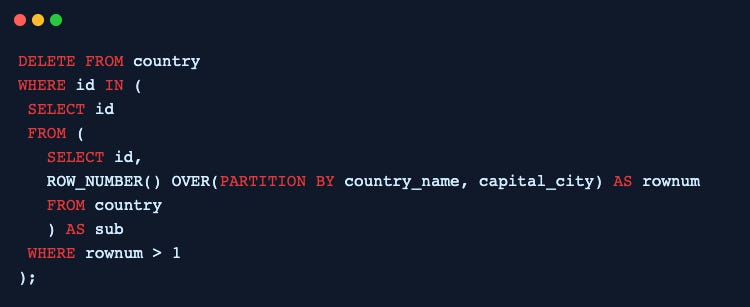


Ask your own follow-ups
Komo answers with sources. Pick up this thread in your own history and keep digging.